Instagram Post Automation — Vienna & Berlin
I automated the Instagram pipeline for WASIST?: events are selected from Supabase, filtered and ranked, rendered into 3-slide carousels, and automatically published for Vienna and Berlin.
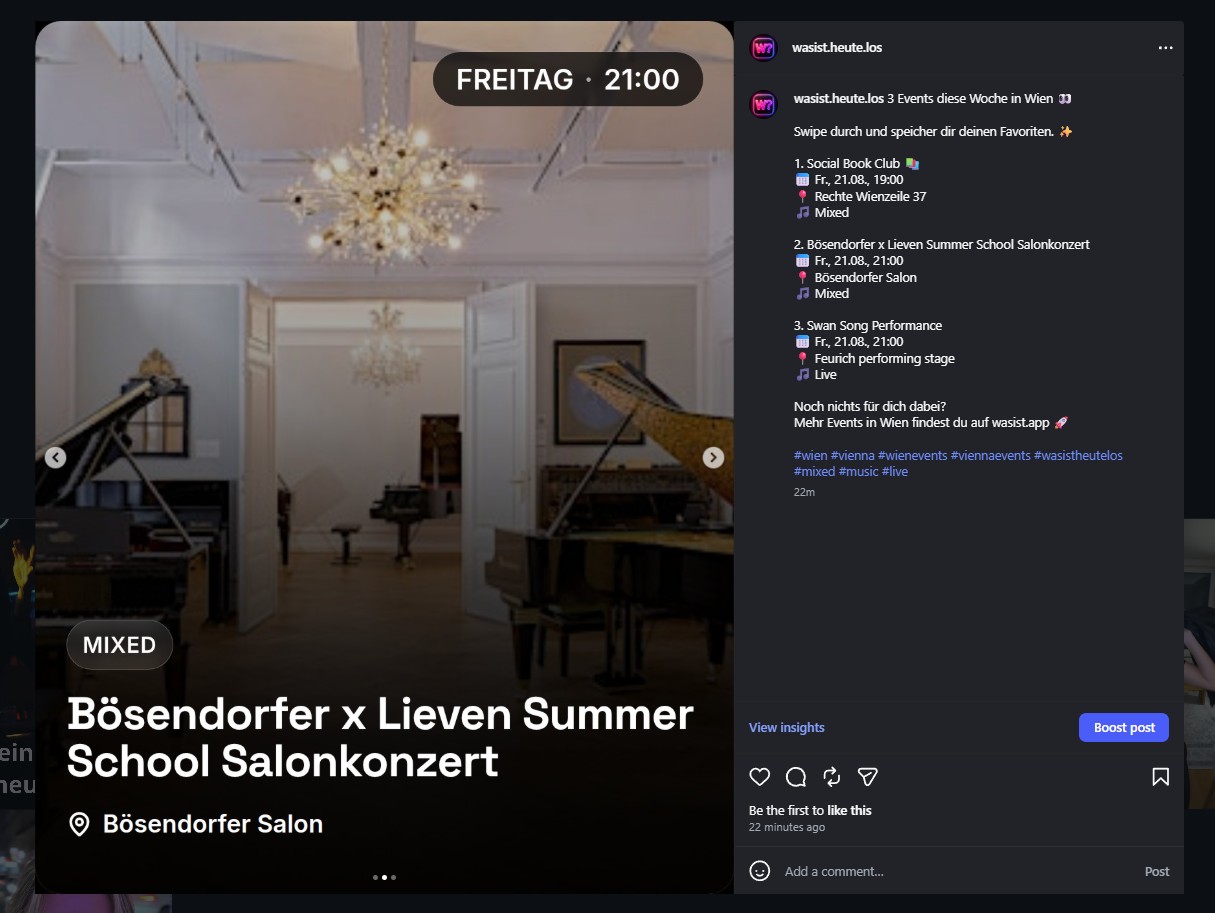
Instagram Post Automation — Vienna & Berlin
Today I finished a pretty big part of the social media automation for WASIST? — Heute los?
The goal was simple from the beginning:
I didn't want to manually search for events every day, build graphics, write captions, and then upload everything to Instagram.
The event data already exists inside WASIST?, so the system should be able to turn that data into social content on its own.
The Pipeline
The full workflow now runs automatically:
- 01Events are loaded directly from Supabase.
- 02Events that were already used are excluded through a social post history.
- 03Unsuitable events are removed by a content quality filter.
- 04The remaining events are ranked using different signals.
- 05A dedicated social card is rendered for each selected event.
- 06Playwright captures a 1080x1350 screenshot.
- 07The three images are uploaded to Supabase Storage.
- 08A dynamic caption is generated.
- 09The Instagram API creates a carousel from the three slides.
- 10After publishing, the batch is stored as published.
The final result is an automatically generated Instagram post with:
- 3 events
- 3 individual slides
- event title
- date and time
- location
- category / genre
- dynamic caption
- relevant hashtags
The Social Cards
I built a dedicated internal route for the social posts:
/internal/social-card/:eventId
This route renders only the event and is specifically designed for automated screenshots.
The cards use Instagram's 1080x1350 format and include:
- full-bleed event image
- dark gradient
- date and time in the top right
- genre badge
- large event title
- location
- optional description
Playwright then takes a screenshot of the finished card.
A Surprisingly Annoying Timezone Bug
At one point I ran into a classic automation bug.
The social card showed:
THURSDAY · 20:00
while the Instagram caption showed:
Thu, 20.08., 21:00
The reason was that the card was still using the old start_time field in some cases, while the caption already used starts_at.
I unified the logic after that.
starts_at is now the single source of truth and is always formatted using the correct local timezone.
For Vienna:
Europe/Vienna
For Berlin:
Europe/Berlin
That also means daylight saving time and winter time are handled automatically.
Content Quality Instead of Posting Random Events
The first automated version worked technically, but it selected some pretty questionable content:
- engineering workshops
- career fairs
- professional training
- admission and certification events
- generic Eventbrite listings
- online webinars
Technically, they were all events.
But they obviously weren't a great fit for an account built around the question:
"What's happening today?"
So I added another quality layer.
Certain event types are now blocked completely, while more relevant leisure and entertainment events receive a ranking bonus.
The system prefers things like:
- concerts
- live music
- clubs
- parties
- raves
- festivals
- comedy
- theatre
- culture
- exhibitions
- food events
- community events
- dating
- sports
- leisure activities
Existing WASIST? signals are also included in the ranking, such as:
- views
- saves
- RSVPs
- trending signals
- quality score
So the automation doesn't just pick the next three events.
It tries to pick the three most relevant ones.
Broken Event Images
Another issue came from external event images.
Some image servers are extremely slow inside GitHub Actions or block browser requests completely.
That meant a good event could get rejected simply because Chrome couldn't load the image fast enough.
I added a second loading path to solve that.
Chrome first tries to load the image normally.
If that fails, Node downloads the original image directly and injects it back into the social card as a Data URL.
This made the screenshot pipeline much less dependent on external image servers.
Publishing Safety
I also wanted to make sure the automation couldn't accidentally publish the same events twice.
For that, I added social_post_history.
Before publishing, the three selected events are stored as reserved.
Immediately before the real Instagram publish, the system checks everything again:
- all three events still exist
- they are still published
- their start times are still valid
- they are still public
- none of them were reported
- all three reservations still exist
Only then does the system call Instagram's media_publish.
One detail was especially important:
Once Instagram confirms that a post was published, those events must never be automatically released again.
Even if something fails afterwards — for example, a database update — the system keeps the events reserved so they cannot accidentally appear in another carousel.
Vienna and Berlin
The first version of the pipeline only supported Vienna.
It is now city-aware.
The active city is passed into the workflow and stored in the manifest, so captions, hashtags, timezone handling, and event selection can change automatically.
For Vienna, a caption can start with:
For Berlin:
The call to action and hashtags are also generated for the correct city.
The current schedule is:
Vienna
Monday to Friday
around 19:15 local time
Berlin
Tuesday, Thursday and Sunday
around 20:30 local time
That means WASIST? can currently publish up to 8 automated Instagram carousels per week.
With three events per carousel, that's up to 24 event slides per week without manually building every post.
Stack
The current automation stack is:
- Supabase
- GitHub Actions
- Node.js
- Playwright
- Google Chrome
- Instagram Graph API
- Supabase Storage
- WASIST? Social Card Renderer
Everything still runs directly on top of the existing WASIST? event database.
No separate social media CMS and no manual event copying.
Result
The most useful part isn't just that Instagram can now publish automatically.
The pipeline can now decide:
- which events are still current
- which events were already used
- which events actually fit the account
- which events look more interesting
- whether the images work
- which city is currently being posted
- which caption should be generated
- whether the post is safe to publish
At this point, Instagram is starting to feel like part of the product itself instead of a completely separate manual process.
Next up: TikTok automation.